


Summary: In terms of performance, Ubuntu 14.10 is slightly degraded (except for the power consumption) compared to 14.04 LTS, but is still a stable release.Contents
I firmly believe that it is a fundamental mistake to release a new version of any operating system every six months (there should at least be a 10-12 months time-frame). It is such a short period for making an OS that contains major new features but is also stable. Otherwise, new releases will have a tendency of drifting towards extremes (being buggy, or stable but boring…).
The recently released Ubuntu 14.10 is no exception as it does not contain new features (from a desktop user’s perspective) at all, even the default wallpaper is the same. First I thought of not reviewing it at all, but later decided for the sake of my readers that I should at least try to come up with a short review that is based on the performance aspects of the operating system.
I downloaded the 64-bit version (with each release, the ISO disc image size is getting bigger & bigger. Now its about 1.2GB), and this release comes with the Kernel version 3.16.0-23, Unity 7.3.1 (with lots of bug fixes & improved support High-DPI displays), Xorg 1.16, Mesa 10.3, LibreOffice 4.3 & Firefox 33.0, mainly.


Below is a summary of the hardware that I tested it on:
Intel Core i3-2330M CPU, Intel HD 3000 GPU, 4GB RAM (DDR3), Toshiba 7200 RPM (320GB) SATA HDD, Intel N-1030 Wireless adapter, Realtek network adapter ('RTL8168'), LED display with 1366x768 resolution (60Hz/60FPS). It's a Dell Vostro V-131 notebook.
Please note that, after first installing the OS, I boot into it few times for letting things to settle down. I added the ‘system monitor’ to the application launcher for getting more accurate memory usage readings (if I were to open it through ‘Dash’ it would have affected accuracy of the memory usage readings) & turned OFF the Bluetooth adapter. These were the only changes I made. And I used Ubuntu 14.04 LTS for the comparison.
The Installer…

There is a slight change that is easily visible in the installer. When running it says ‘Install as superuser’. Not that it carries any significance, but for the sake of mentioning a new feature, it is one 🙂 .
Boot-up Speed…

Ubuntu 14.10, as you can see above, boots somewhat slower compared to 14.04 LTS. It is roughly a 15.8% increase. In fact, my previous data (from Ubuntu 13.04 to 14.10) indicates that the boot-up times of Ubuntu is actually slightly increasing. Ubuntu 12.10 & 13.04 used to boot within 19-20 seconds!, but now it is very close to the range of many KDE based distributions.
Memory Usage Upon Desktop Loading…

Initial memory usage after the desktop was fully loaded in Ubuntu 14.10 is also slightly increased (about 6%). One of course should not worry about such a small change. Plus, RAM consumption below 400MiB is a rare thing for a modern operating system nowadays.
Power Usage it Idle…
I complained a bit about the power consumption under Ubuntu 14.04 LTS, although still not as good as under Ubuntu 13.04 (12.2 Watts), Ubuntu 14.10 has managed to decrease the power usage by 4.6% (=0.6 Watts). I did not bother to install a power usage optimizer like ‘TLP’, but I am sure I could have been able to reduce it further more if I had it installed.


P.S: When measuring, as I always do, I let the laptop computer idle with Wi-Fi turned ON & Bluetooth turned OFF and kept the screen at its maximum brightness level (dimming and screensaver disabled).
CPU Usage at Idle…

Just as usual, ‘system monitor’ itself kept consuming 5-7% CPU cycles (something that is probably never going to be fixed), but other processes did not interfere with the CPU for long periods. It was good.
Compiz FPS readings when Screen is at idle…
‘Compiz’ is the default window manager used in Ubuntu, and it comes with a plugin that lets you see the current frame rate (frames per seconds = fps). Past versions of Ubuntu had this issue where Compiz would increase the frame when the desktop, ‘Dash’ or ‘HUD’, let idle, once got opened.

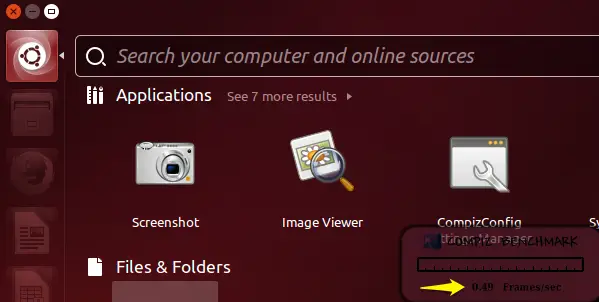


These issues were fixed in the Ubuntu 14.04 LTS and I am happy to report that nothing has changed in Ubuntu 14.10 as well. In all those instances, the OS was able to keep the fps close to zero (except while I had opened ‘HUD’ where the frame rate would rarely go below 2-2.6, but that was how it was under Ubuntu 14.0 LTS, and I think the reason is the blinking cursor).
Hardware Recognition & ACPI…
All my hardware worked well, except the fingerprint reader which is not supported by Linux yet. The OS was also able to remember the powered ON/OFF state of my Bluetooth adapter, but sometimes it got automatically turned ON. As usual, at each login, my previously set screen brightness level also got reset to its maximum (ai yai yai). These are of course not big issues, but after all this time they are still there.
Sleep and Wake up functions worked without any major issues. However, sometimes when waking up from sleep, display brightness got reset to its maximum & the Bluetooth adapter got turned ON. But I have seen this issue in some earlier versions of Ubuntu as well.
My laptop’s fan noise is also extremely low under Ubuntu (14.10 included).
System Responsiveness…
A good operating system is also a one that is capable of being responsive, even under stress (disk I/O stress, specifically). I tried to measure it by what I usually do. While copying a file (about 1.5GB) within the ‘Home’ folder, I tried to open a multimedia file through VLC (yes I manually installed it) and then searched through ‘Dash’ and tried to open ‘LibreOffice Writer’, Terminal window, system monitor, Shotwell, System Settings & desktop background changer (through the desktop right-click context menu). So how did it all go?
I did not go that well at all. Except for the terminal emulator, the OS failed to finish loading any other application (VLC included) before the file copying was finished. One thing that I observed was that, no matter how many application executions I requested from the OS, the file copy speed was kept by the I/O scheduler (the tool which governs the disk’s read/write operations) at a constant (almost) pace. This is the reason why the OS failed to finish loading applications, as the disk’s read/write was intensively used by the file copy process. The priority set by the disk I/O scheduler for the file copy process was too much.
Now, as you probably know, Linux includes three disk I/O schedulers: ‘noop’, ‘deadline’ & ‘cfq’ (default). From somewhat recent times, Ubuntu uses ‘deadline’ as the default I/O scheduler. And from my previous experience too, ‘deadline’ used to be slightly better than ‘cfg’ in terms of making the OS more responsive. But with this version of the Kernel, things seems to have changed (perhaps someone has tuned ‘deadline’ with different parameters). I carried out this test 2-3 times (I rebooted the PC between each attempt), but the result was the same.
So I decided to switch back to ‘CFQ’ to see if it improves things, because ‘CFQ’, which stands for ‘Completely Fair Queueing’, tries to deliver a ‘fair’ disk bandwidth to each process, which actually should be able fix the above scenario, or at least improve things a bit. So after changing the disk I/O scheduler, I rebooted the PC and carried out the same test. So how was it this time?

It was awesome!!. Not only all the applications were opened up quickly, long before the file copying finished, VLC also was able to carry out the audio & video playback (720p) without any interruptions whatsoever. Unsurprisingly, the file copy speed was slower and took a bit more time to finish, because ‘CFQ’ shares the available disk’s I/O bandwidth fairly among the processes. There is no way of achieving that level of OS responsiveness without making such sacrifice, I would not have been more happier 😀 .
So if you too experience similar issues, then my humble advice is that you should try switching to ‘CFQ’ to see if it fixes it (I’ll come up with a separate article on how to do that).
Shutdown Delay…

Ubuntu 14.10 was a slow (roughly 29.7%) while shutting down compared to 14.04 LTS. Still, 4.8 seconds is pretty fast though.
Final Words…
Except for the responsiveness related issue, my experience with Ubuntu 14.10 has been so far a good one, though Ubuntu 14.04 LTS is slightly better in terms of performance. Stability-wise, I would say they both are pretty good. What I am trying to say is that, if you are an Ubuntu 14.04 LTS user and quite content with it, then there really is no need to switch to 14.10. After all, it (14.10) is going to be short lived (9 months support only).
But if you want to give it a try nonetheless, then by all means, please do it, it is after all, seems pretty stable to me. You can download it from here. Thank you for reading.

26 Comments
Really nice review. I appreciate your article, thank you so much, for this. You are right using the cfq as default gobernor is better than deadline, I think thats why in smartphones(android), this gobernor is the default for stock ROM´s. Although, Ubuntu is not my favorite Distro, is for more my platonic romance. My first Linux Distro and a really important for Linux world.
You’re welcome saul.
Ubuntu 14.10 IN my pc is slower and boot slower, after boot when i open the first program, i take a little longer
Ubuntu 14.10 is fluid ,but I am facing problem like shut down delay (take around 10-12 sec.), filezilla (sometime cursor and backpace button not working)
Hmm, I haven’t seen any shutdown related issues so far though…
Gayan, what utilite did you use to determine power usage?
Hi Pavel,
I used Colin’s awesome ‘powerstat’ (https://hecticgeek.com/2012/02/powerstat-power-calculator-ubuntu-linux/) utility for that.
I presume you informed ubuntu about the CFQ stuff?
No I haven’t, yet…
Nice review. Thanks!
btw this reviewer on youtube https://www.youtube.com/watch?v=e-XiRW4kuLI said that he was experiencing a better performance with the 14.10 edition compared to 14.04.
Hi Tony,
Thank you for the appreciation 🙂 . Concerning the video review… it’s a nice review, but Matthew’s claim of the performance increase seems to be primarily based on the GPU performance enhancements only.
Very nice article. As you said, the version 14.10 is a little slower (boot/shutdown) than 14.04. The only issue I have is the video displat on fullscreen, in Ubuntu 14.10 freeezes a lot. Maybe a problem with adobe flash because with HTML 5 is not so notorious but present also.
You’re welcome Francisco.
Hi,
I’ve tried Ubuntu 14.10 on several PCs and I encounter always the same problem,
compiz with open source drivers (both AMD Radeon HDxxxx and Nvidia GTs) using 60-70% of cpu load for … mysteries of compiz…
With Nvidia cards I can manage by switching to proprietary drivers, bit for AMD HD2xxx, HD3xxx, HD4xxx AMD does not provide the Catalyst legacy driver.
I’ve tried any possible compiz, unity, ubuntu desktop reset/reinstall but I still have my quad cores at 50% constant cpu load…
I guess I need some help
Mauro
I’m sorry Mauro, I can’t answer that because I don’t have a GPU other than Intel …, have you tried ‘AskUbuntu.com’ ?
Brilliant work Gayan! Your article is quite informative and factual. I’m an ardent reader of your website and learning Windows, Ubuntu from it. Bookmarked it. Keep on posting awesome stuff.
Thank you very much 🙂 .
i am using ubunt 14.04LTS, and i can see it is much slower than windows. Much slower means really slow as compared to older versions of ubuntu
sir, am a beginner to ubuntu, just want to switch from windows 7 to ubuntu…but there are 2 downloadable versions…confused..which one to install? and what LTS means?
Hi Suoy,
LTS version gives you 5 years of support (software security updates), but you won’t be getting latest software updates in that period. Other non-LTS versions are only supported up-to 9 monts only, but they include & make available (within the 9 months period) latest software & security updates.
In other words, if you want to install Ubuntu and keep using it without having to upgrade (or re-install) whenever a new version gets released after 9 months, then go for the LTS. But if you want to keep using latest software versions and willing to upgrade (or re-install) the OS after every 9 months, then the non-LTS is the best choice for you.
Good luck.
Thank you!! given my limited network access , i think i should stick to 14.04 ..thank u very much….but can u make available a quick guide to ubuntu??
On my Lenovo T420s Ubuntu 14.10 feels much smoother than Ubuntu 14.04/14.04.01.
Unity reacts much faster. 14.04 feels laggy on this machine after installing it after 14.10.
no operating system can be BORING if it is STABLE and causes no problems for the user!
I’ll install the 14.10 soon!IT’S WORTH IT!
You are welcome bro
Nice article sir,
i thought ubuntu 14.0 is faster than windows 7 but it wasnt. it freezes especially the file manager if there are many-many files in your folder.
Sorry to hear that Jaypee…